MedAugmentX
Clinically-aware medical image augmentation for AI training.





MedAugmentX is a purpose-built Python library for data augmentation of medical
images. Unlike general-purpose libraries (torchvision, albumentations), it
treats the unique properties of medical data — anisotropic 3D volumes,
modality-specific artifacts, mask consistency, and clinical I/O — as
first-class concerns.
Zero deep-learning dependencies in the core install. The library requires
only NumPy and SciPy by default. PyTorch, MONAI, and TorchIO remain optional
extras, with lightweight dataset adapters available in medaugmentx.interop.
MedAugmentX is intended for research and training-data augmentation workflows. It is not a diagnostic device, clinical decision-support system, or substitute for local clinical, regulatory, security, and dataset validation.
For normalization, patient coordinates, worker seeding, exact replay and changed
defaults, read the v1 migration guide. Inspect any policy
with preview_augmentation and consult model cards.
Release evidence and remaining external validation are recorded in
release readiness.
Why MedAugmentX
Problem with general-purpose augmentation |
What MedAugmentX does |
|---|---|
Treats every image as 2D RGB |
Native 3D volumes with anisotropic-aware ops |
No MRI-specific noise or artifact models |
Rician magnitude-noise model and approximate bias, k-space, and ghosting effects |
CT/DXR augmentation is generic brightness shift |
Window/level variation, beam hardening, resolution simulation |
Masks drift on complex transforms |
Image and mask use the same sampled geometry; labels use nearest-neighbour interpolation |
No tomosynthesis support |
Dedicated DBT module with slab-aware augmentations |
DICOM/NIfTI I/O scattered across libraries |
Optional loaders into |
Pipelines can’t be saved or reloaded |
Full JSON/YAML serialisation with round-trip reconstruction |
See the transforms
Explore MRI, CT, X-ray, and digital breast tomosynthesis with actual MedAugmentX outputs. Each row compares a synthetic input with two independently applied transforms.
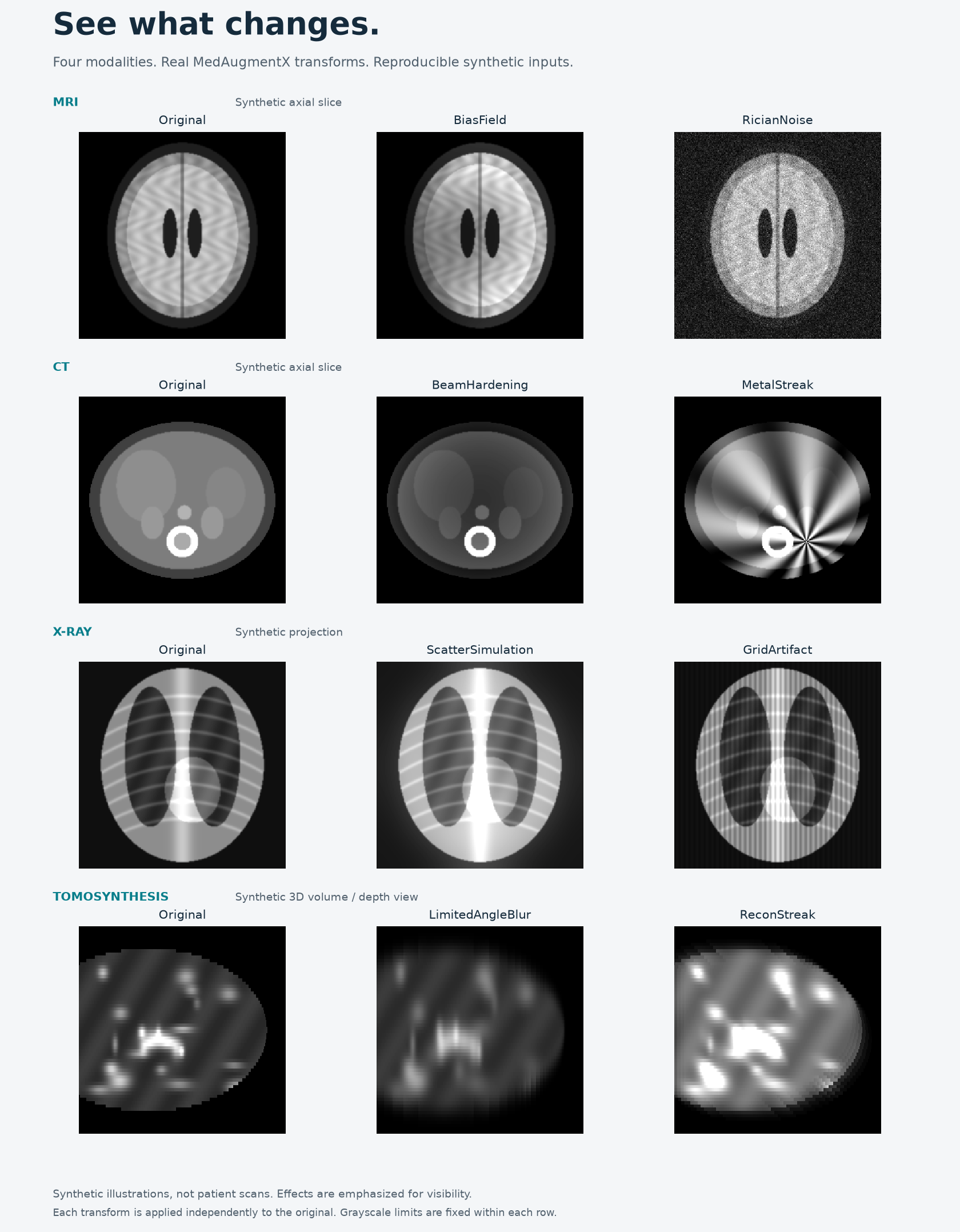
Synthetic illustrations, not patient scans. Effects are emphasized to make the differences visible; these are not recommended training settings or proof of clinical realism. All panels in a row share the same grayscale limits. The DBT row shows a depth cross-section through a 3D volume.
Try one of the examples:
from medaugmentx.transforms import BiasField, MetalStreak, ScatterSimulation, LimitedAngleBlur

mri_aug = BiasField(alpha=0.65, seed=7)(mri_volume)
ct_aug = MetalStreak(intensity=0.16, num_streaks=9, seed=7)(ct_volume)
xray_aug = ScatterSimulation(fraction=0.5, sigma=22, seed=7)(xray_volume)
dbt_aug = LimitedAngleBlur(arc_degrees=15, base_sigma=1.8, seed=7)(dbt_volume)
Here, each input is a MedVolume; DBT requires a 3D image. To reproduce the
entire gallery without downloading data, run
examples/generate_readme_gallery.py.
The gallery manifest records every
transform configuration, display range, and dependency version.
The inputs come from medaugmentx.phantoms, which
generates brain, abdomen, chest, and tomosynthesis volumes from analytic shapes
— so you can try any transform without supplying data of your own:
from medaugmentx.phantoms import ct_phantom

volume = ct_phantom()          # 2D axial slice in Hounsfield units
For guided walkthroughs of each modality, see the tutorial notebooks: why MR noise is Rician, why CT windowing is both a display step and an augmentation, and why tomosynthesis needs anisotropy-aware transforms.
Commercial Readiness
MedAugmentX is designed to be easy to evaluate inside serious medical AI teams:
Lightweight core: only NumPy and SciPy are required by default.
Optional integrations: PyTorch, MONAI, TorchIO, DICOM, NIfTI, and YAML support stay behind extras.
Reproducible pipelines: every transform is seedable and serialisable.
Mask-safe spatial ops: image and mask geometry share the same sampled transform parameters.
Typed package: ships
py.typedfor downstream type checkers.Clear adoption guidance: see Commercial adoption, Documentation, and Security.
Teams using MedAugmentX in regulated or customer-facing products should validate augmentation policies on their own data, version-control pipeline JSON/YAML, and document intended use before deployment.
Install
# Core (NumPy + SciPy only)
pip install medaugmentx

# With DICOM/NIfTI I/O
pip install "medaugmentx[io]"

# With YAML serialisation support
pip install "medaugmentx[yaml]"

# Optional framework extras
pip install "medaugmentx[torch]"      # PyTorch / torchvision tensors
pip install "medaugmentx[monai]"      # MONAI projects
pip install "medaugmentx[torchio]"    # TorchIO subjects
pip install "medaugmentx[frameworks]" # PyTorch + MONAI + TorchIO
The medaugmentx studio command (the local Policy Studio) is included in the
core install; use the io extra to open DICOM or NIfTI files in it.
Verify the installation:
import medaugmentx
print(medaugmentx.__version__)   # 1.1.0
Quick start
One-line preset
The fastest way to get started is a pre-built modality preset:
import numpy as np
from medaugmentx import MedVolume
from medaugmentx.presets import mri_pipeline

vol = MedVolume(np.random.default_rng(0).random((8, 32, 32)).astype(np.float32))
pipeline = mri_pipeline(seed=42)
augmented = pipeline(vol)          # MedVolume in, MedVolume out
Four presets ship out of the box — see Preset pipelines below.
Build your own pipeline
import numpy as np
from medaugmentx import MedVolume, Compose, OneOf
from medaugmentx.transforms import (
    RandomAffine, ElasticDeform,
    BiasField, RicianNoise, GaussianNoise, GammaCorrection,
)

vol = MedVolume(
    image=np.random.rand(80, 256, 256).astype(np.float32),
    mask=np.zeros((80, 256, 256), dtype=np.uint8),
    spacing=(1.0, 0.7, 0.7),          # mm per axis (z, y, x)
    metadata={"modality": "MR"},
)

augment = Compose([
    RandomAffine(rotation=15, scale=(0.9, 1.1), p=0.7),
    ElasticDeform(alpha=(10, 120, 120), sigma=(3, 10, 10), p=0.5),
    BiasField(alpha=0.3, p=0.7),
    OneOf([
        RicianNoise(std=(0.005, 0.02)),   # MRI physical noise model
        GaussianNoise(std=0.015),          # simpler additive noise
    ], p=0.5),
    GammaCorrection(gamma=(0.8, 1.2), p=0.5),
], seed=42)

out = augment(vol)           # mask kept in sync automatically
print(out.image.shape, out.mask.shape)
Standardize voxel spacing across scans
Use ResampleToSpacing when the model expects a common resolution in
millimetres. It retains the physical centre, grid directions, and shear, and
updates masks, geometric targets, and the affine together:
from medaugmentx.transforms import ResampleToSpacing, Pad, CenterCrop

resample = ResampleToSpacing((1.0, 0.7, 0.7), max_voxels=32_000_000)
out = resample(vol)                # spacing is in array order: z, y, x
out = CenterCrop((64, 256, 256))(Pad((64, 256, 256))(out))
Spacing is exact; output dimensions are rounded, so the field of view can
change slightly. Resize instead preserves voxel extent while choosing a
fixed shape. Neither operation reorients scans or registers patients. The
voxel limit can bound output size before resampling; it is not a peak-memory
limit. Downsampling can remove small mask labels.
When registered scans need the same orientation, origin, spacing, and shape,
use ResampleToGrid(reference.shape, reference.affine). Both scans must
already share a patient coordinate system. This also lets you move processed
data back onto its original grid. See the
spacing and patch example.
When an affine is available, convert external RAS-mm landmarks with
vol.world_to_index(points) and export them with vol.index_to_world(points).
For 2D images, off-plane world points raise explicitly.
Spatial transforms use nearest-neighbour interpolation for masks, so label IDs
are never blended. Cropping and resampling can remove small structures or whole
classes; Guard can check for label loss.
Sample fixed-size segmentation training patches
Use ClassBalancedCrop to give small and large mask classes an equal chance
of anchoring a foreground patch within a scan. The patch has the requested
shape even when a scan has short axes.
from medaugmentx import apply_for_sample
from medaugmentx.transforms import ClassBalancedCrop

patch_policy = ClassBalancedCrop((32, 96, 96), foreground_prob=0.75, labels=(1, 3))
patch = apply_for_sample(patch_policy, prepared_volume, seed=42, sample_id=scan_id, epoch=epoch)
Set labels to the mask classes that should anchor patches. The uniform branch
and scans without an eligible class sample across the whole image. Padding uses
class 0 in the mask. Choose cval in the image’s intensity units, for example
-1024 for air in raw CT. See the research guide
for training and evaluation details.
Augment registered channels together
Load separately acquired channels as volumes and check that they share a patient grid before building a model input.
from medaugmentx import Compose, PerChannel, apply_for_sample
from medaugmentx.io import load_nifti
from medaugmentx.transforms import BiasField, ClassBalancedCrop, GaussianNoise, RandomAffine

t1 = load_nifti("t1.nii.gz", mask_path="segmentation.nii.gz")
flair = load_nifti("flair.nii.gz")
sample = t1.with_channels({"flair": flair})
policy = Compose([
    RandomAffine(rotation=8),
    ClassBalancedCrop((32, 96, 96)),
    PerChannel(Compose([BiasField(alpha=0.3), GaussianNoise(std=0.02)])),
])
patch = apply_for_sample(policy, sample, seed=42, sample_id=scan_id, epoch=epoch)
inputs, target = patch.stack_channels("flair"), patch.mask
Spatial transforms sample one geometry for all channels and shared annotations.
Intensity transforms act on the primary image unless wrapped in PerChannel,
which gives each image its own draw (or one shared draw with shared=True)
while keeping the whole policy serialisable and replayable.
To compare policies across training seeds and held-out patients, use
compare_segmentation_policies. Runnable comparison
Preset pipelines
Ready-to-use Compose pipelines for common modalities. All presets are
seeded, deterministic, and serialisable.
from medaugmentx.presets import mri_pipeline, ct_pipeline, dxr_pipeline, dbt_pipeline

mri  = mri_pipeline(seed=42)   # bias field, Rician noise, ghosting/k-space
ct   = ct_pipeline(seed=42)    # window/level, Gaussian noise, beam hardening
dxr  = dxr_pipeline(seed=42)  # blur, brightness/contrast, low-resolution sim
dbt  = dbt_pipeline(seed=42)  # slab shift, limited-angle blur, anisotropic elastic
Each preset is a starting point — tune the parameters or swap transforms for your dataset.
ct_pipeline expects native HU-scale inputs and keeps that intensity scale;
its windowing clips without normalising. Apply any deterministic model-input
windowing/normalisation afterwards. MRI, DXR, and DBT presets use noise or
brightness settings intended for roughly [0, 1] inputs. Presets operate in
voxel coordinates and do not infer anatomical directions from patient metadata.
Serialisation
Pipelines serialise to JSON (built-in) or YAML (optional PyYAML):
from medaugmentx.serialization import to_json, from_json

pipeline = mri_pipeline(seed=42)

# Save
json_str = to_json(pipeline)
with open("pipeline.json", "w") as f:
    f.write(json_str)

# Reload — exact same structure, ready to run
pipeline2 = from_json(open("pipeline.json").read())
out = pipeline2(vol)
Custom transforms can be registered so they serialise too. The
@register_transform decorator validates the class and refuses to silently
shadow a built-in name:
from medaugmentx.core import Transform
from medaugmentx.serialization import register_transform

@register_transform
class MyTransform(Transform):
    ...
Direct assignment (REGISTRY["MyTransform"] = MyTransform) still works.
Pipeline inspection
Use pipeline_summary to log or review a compact tree of any transform or
nested pipeline before saving it with your experiment artifacts:
from medaugmentx import pipeline_summary
from medaugmentx.presets import mri_pipeline

print(pipeline_summary(mri_pipeline(seed=42)))
Example output:
Compose(p=1.0, seed=42)
  0 RandomFlip(...)
  1 RandomAffine(...)
  2 OneOf(...)
    2.0 GhostingArtifact(...)
    2.1 KSpaceDropout(...)
For programmatic inspection, iter_pipeline(pipeline) yields PipelineStep
objects with path, name, params, and depth.
Policy Studio
Design, preview, and stress-test a policy on your own scans in a local web app, then export exactly what your training code loads. It ships with the package, needs no extra dependencies, binds to localhost behind a per-session token, and loads nothing from the network, so images stay on your machine.
medaugmentx studio --image t1.nii.gz --mask seg.nii.gz # or --phantom mri
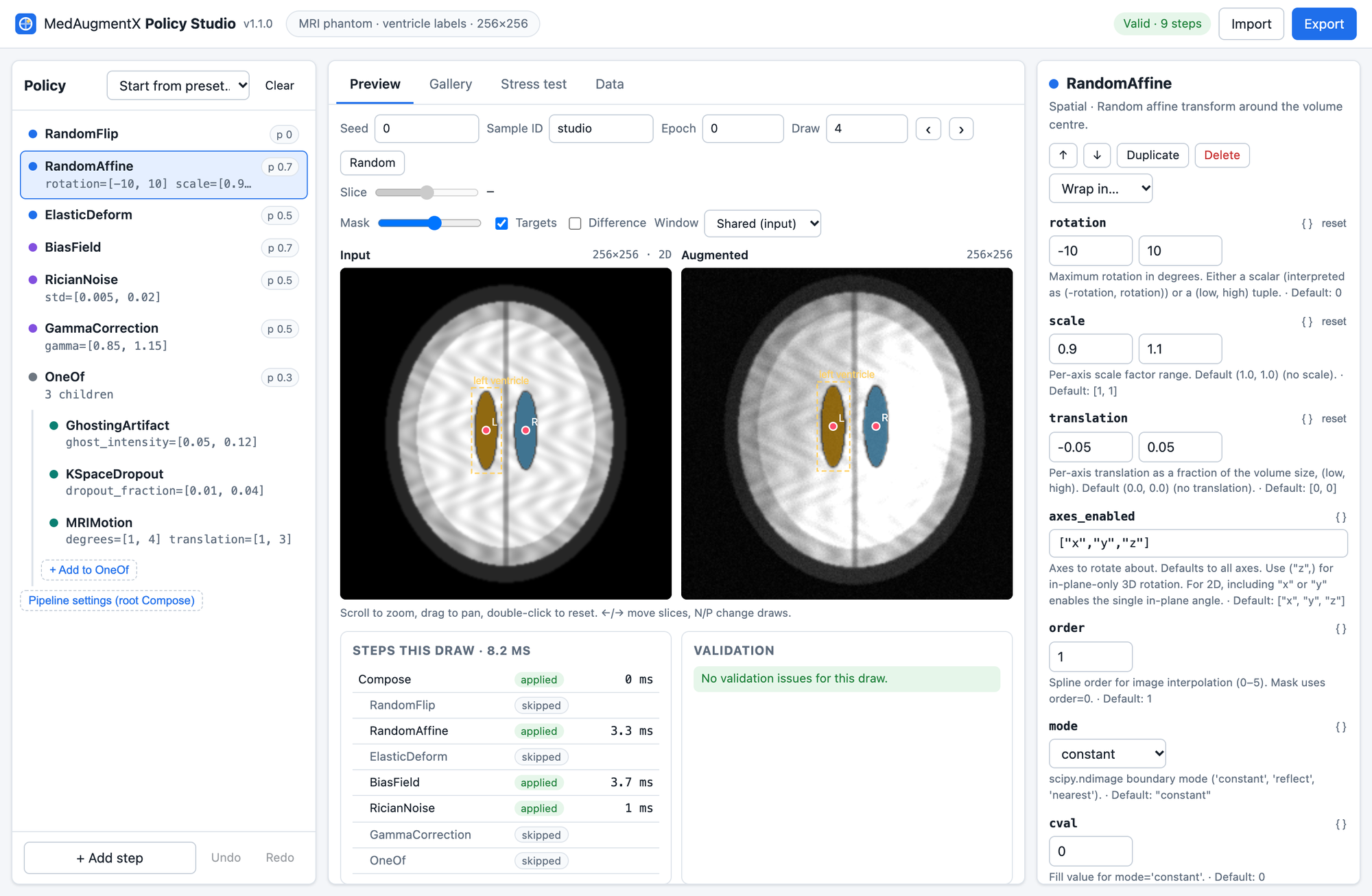
Build policies from presets or a searchable transform palette, with nested
Compose/OneOf/SomeOf/Guard/PerChannel, type-aware parameter editing, model cards, and undo/redo.Preview input and augmented slices side by side with mask, landmark, and box overlays, a difference view, and synchronised zoom. Draws use the same
seed/sample_id/epochseeding asapply_for_sample, so you can see exactly what training saw.Stress-test hundreds of draws for validator rejections, exceptions, timing, output shapes, and how often each step actually ran.
Export hash-verified JSON, YAML, or readable Python; download a replay record for any draw.
From a notebook, studio = launch(policy, volume, block=False) opens the same
app and studio.current_policy() returns the edited policy. See the
Policy Studio guide.
Detection & landmark targets
MedVolume can carry keypoints (landmark coordinates) and bounding
boxes alongside the image and mask. Every spatial transform maps them alongside
the pixels, so detection and landmark annotations stay aligned
through the whole pipeline — no separate bookkeeping.
import numpy as np
from medaugmentx import Compose, MedVolume
from medaugmentx.transforms import RandomFlip, RandomAffine, Resize

vol = MedVolume(
    image=np.zeros((256, 256), dtype=np.float32),
    keypoints=np.array([[120.0, 80.0]]),          # (y, x) — array-index order
    keypoint_labels=np.array(["nipple"]),
    bboxes=np.array([[100.0, 60.0, 150.0, 110.0]]),  # [y_min, x_min, y_max, x_max]
    bbox_labels=np.array(["mass"]),
)

augment = Compose([RandomFlip(axes=("x",)), RandomAffine(rotation=15), Resize((512, 512))], seed=0)
out = augment(vol)

out.keypoints    # moved with the anatomy; labels ride along unchanged
out.bboxes       # re-bounded to a valid axis-aligned box after rotation
Coordinates are in array-index order — (z, y, x) for 3D, (y, x) for 2D —
the same order used to index image, and boxes are [min…, max…]. Boxes are
transformed via their corners and re-bounded, so they remain valid under
rotation. Transforms map targets faithfully and never drop them; after a crop,
out.remove_out_of_bounds_targets() prunes off-frame keypoints and clips or
drops boxes, keeping labels aligned. DBT SlabShift and CompressionVariation also move targets. Intensity and
non-geometric artifact transforms leave targets untouched. Elastic box mapping defaults to conservative displacement bounds; the optional
corner-only mode approximates the warped extent. See
examples/keypoints_bboxes.py.
Safe augmentation
Augmentation can silently produce training-unusable volumes — NaN pixels, an
image collapsed to a constant, a mask that no longer matches the image, or a
spatial draw that crops the only labelled structure out of frame. None of these
raise on their own; they just quietly degrade the dataset. VolumeValidator
audits a volume against clinical-plausibility rules, and Guard wraps any
transform or pipeline so bad draws are caught on every call.
from medaugmentx import Compose, Guard, VolumeValidator
from medaugmentx.transforms import RandomAffine, GammaCorrection

validator = VolumeValidator(
    intensity_bounds=(0.0, 1.0),   # windowed / normalised inputs
    max_foreground_loss=0.5,       # a spatial draw may not crop away >50% of a structure
    preserve_mask_labels=True,     # never lose a labelled class entirely
)

# Audit directly:
report = validator.validate(augmented, reference=original)
if not report:
    print(report)                  # human-readable list of errors and warnings

# Or guard a whole pipeline — retry bad draws, fall back to the input if none pass:
pipeline = Guard(
    Compose([RandomAffine(), GammaCorrection()]),
    validator,
    on_fail="retry",               # "raise" | "warn" | "revert" | "retry"
    retries=3,
    seed=42,
)
safe = pipeline(vol)
Guard is itself a transform, so it nests inside Compose/OneOf/SomeOf
and serialises to JSON/YAML like everything else. See
examples/safe_augmentation.py.
Scope. These are structural and statistical sanity checks (finite values, dynamic range, mask/label bookkeeping, intensity drift). They catch augmentation that is obviously unusable; they do not verify anatomical correctness or clinical validity, and a passing report is not a substitute for your own dataset review. Tune the thresholds to your normalisation and labelling conventions.
Loading real volumes
from medaugmentx.io import load_dicom_series, load_nifti, save_nifti

vol_ct  = load_dicom_series("/path/to/study/CT_chest/")  # MedVolume
vol_mri = load_nifti("brain_t1.nii.gz")                   # MedVolume

augmented = ct_pipeline(seed=0)(vol_ct)
save_nifti(augmented, "ct_augmented.nii.gz")
Both loaders populate spacing and selected source metadata. NIfTI does not
generally encode modality or vendor, so these are not inferred by that loader.
Patient geometry uses an authoritative array-index-to-RAS-mm affine and is
updated after crop, pad and resize. Use mask_path to load/export registered
NIfTI labels. See v1 migration and integration limits.
For labels already registered to the image but stored on a different sampling grid, opt in to nearest-neighbour alignment at load time.
volume = load_nifti("image.nii.gz", mask_path="labels.nii.gz", resample_mask=True)
The default requires matching grids. With alignment enabled, both files must have coded geometry, and the loader raises if sampling removes every nonzero label. Check small structures after downsampling.
Requires the
ioextra:pip install "medaugmentx[io]"
Framework interop
Use TorchTransform when your dataset returns tensors, NumPy arrays, tuples,
or dict samples. The adapter keeps PyTorch optional: tensors are supported at
runtime, but importing MedAugmentX never imports torch.
from medaugmentx.interop import TorchTransform
from medaugmentx.presets import mri_pipeline

augment = TorchTransform(
    mri_pipeline(seed=None),
    image_key="image",
    mask_key="mask",
    channel_dim=0,        # handles (1, D, H, W) tensors
)

sample = {"image": image_tensor, "mask": mask_tensor, "spacing": (1.0, 0.7, 0.7)}
sample = augment(sample)
For MONAI-style dicts that use label instead of mask:
from medaugmentx.interop import MonaiMapTransform

augment = MonaiMapTransform(mri_pipeline(seed=None), image_key="image", label_key="label")
For TorchIO subjects:
from medaugmentx.interop import TorchIOTransform

augment = TorchIOTransform(mri_pipeline(seed=None), image_key="t1", label_key="seg")
subject = augment(subject)
See API examples and the API reference.
What’s available
Core
Component |
Description |
|---|---|
|
Container: image + optional named channels, mask, keypoints, bounding boxes, spacing, metadata |
|
Abstract base — probability gating, seedable RNG, |
|
Sequential pipeline with deterministic child seeding |
|
Random selection from a set of transforms |
|
Apply an intensity policy to the primary image and named channels, with independent or shared draws |
|
Human-readable and programmatic pipeline inspection |
|
Local Policy Studio for designing, previewing, and stress-testing policies |
|
Clinical-plausibility checks (finite, non-constant, mask sync, intensity bounds, foreground/label preservation, drift) |
|
Wrap a transform/pipeline; validate every output and |
Spatial transforms
Transform |
What it does |
|---|---|
|
Rotation + scaling + translation, 2D/3D, axis-aware |
|
Per-axis flip with independent probability |
|
Foreground-biased random crop |
|
Fixed-size crop with uniform sampling among eligible mask classes |
|
Gaussian-smoothed elastic displacement fields with per-axis parameters |
|
Cutout-style random box occlusion (2D/3D) |
|
Resample to a fixed shape (rescales spacing) |
|
Standardize voxel spacing while preserving the physical centre |
|
Sample onto a registered reference shape and patient-space affine |
|
Centre-pad up to a target shape |
|
Centre-crop to a target shape |
Intensity transforms
Transform |
What it does |
|---|---|
|
Additive zero-mean Gaussian noise |
|
Single-complex-signal magnitude noise model; reconstruction assumptions matter |
|
Power-law contrast, normalisation-aware |
|
Smooth multiplicative field (MRI coil inhomogeneity) |
|
Random CT window/level shift (protocol variation) |
|
Additive brightness + multiplicative contrast |
|
Isotropic Gaussian blur |
|
Edge-preserving median filter (salt-and-pepper / speckle) |
|
Downsample + upsample (cross-site resolution variation) |
|
Unsharp-mask edge enhancement |
|
Contrast Limited Adaptive Histogram Equalization |
|
Match intensity histogram to a reference distribution |
Modality-specific — MRI
Transform |
What it does |
|---|---|
|
Phase-encoding ghosting (shifted attenuated replica) |
|
Random k-space line zeroing with Gibbs ringing reconstruction |
|
In-plane rigid motion blur/ghosting (averaged motion states) |
Modality-specific — CT
Transform |
What it does |
|---|---|
|
Radially-symmetric cupping artifact |
|
Radiating bright/dark streaks from dense implants |
Modality-specific — X-ray (DXR)
Transform |
What it does |
|---|---|
|
Low-frequency scatter (veiling glare), lowers contrast |
|
Stationary anti-scatter grid line pattern |
Modality-specific — Tomosynthesis (DBT)
Transform |
What it does |
|---|---|
|
Z-axis reconstruction-centre variation |
|
Arc-angle-dependent Z-only blur |
|
Random slice zeroing (robustness) |
|
DBT-default elastic deformation |
|
Breast-paddle compression variation (mask-consistent) |
|
Limited-angle out-of-plane parallax replicas |
I/O
Helper |
Description |
|---|---|
|
3D volume from a DICOM series directory |
|
MedVolume from |
|
Write MedVolume to NIfTI |
Interop
Adapter |
Description |
|---|---|
|
Generic adapter for arrays, tensors, tuples, dicts, and |
|
PyTorch / torchvision-friendly alias for dataset samples |
|
MONAI-style dict adapter with |
|
TorchIO |
Reproducibility
Every transform is seedable. Fresh, equivalent pipelines reproduce the same sequence of outputs in the same software environment:
a = Compose([...], seed=42)(vol)
b = Compose([...], seed=42)(vol)
assert np.array_equal(a.image, b.image)
Repeated calls advance the random state. JSON/YAML preserves integer constructor seeds, not an in-progress RNG checkpoint. Cross-platform bitwise equality is not guaranteed. See the Research guide for worker seeding, experiment records, evaluation reporting, and citation.
Project status & roadmap
Phase |
Status |
|---|---|
1 — Core MVP |
✅ Core data model, spatial/intensity transforms, DBT, DICOM/NIfTI I/O |
2 — Modality artifacts & serialisation |
✅ MRI (bias field, ghosting, k-space), CT (beam hardening), presets, JSON/YAML |
3 — Framework interop and v1.0 (CPU) |
|
Detailed deliverables: docs/MILESTONES.md. Developer API: the transform catalog and API reference.
Contributing
We welcome PRs — new transforms, vendor DICOM coverage, and bug reports with sample data are especially valuable. See CONTRIBUTING.md for the development setup, testing conventions, and the transform-authoring template.
License
MIT — see LICENSE.